- Python
- Data cleaning
Coordinate Deduplication Tool
A Python project that finds and removes duplicate coordinate records.
The why
What problem was worth solving?
I needed a quick way to remove duplicate latitude and longitude combinations from an Excel file without manually reviewing thousands of rows.
The goal was a repeatable process: leave the original data untouched, remove duplicate coordinates, and export a clean file for downstream use.
The work
What did I build, and how?
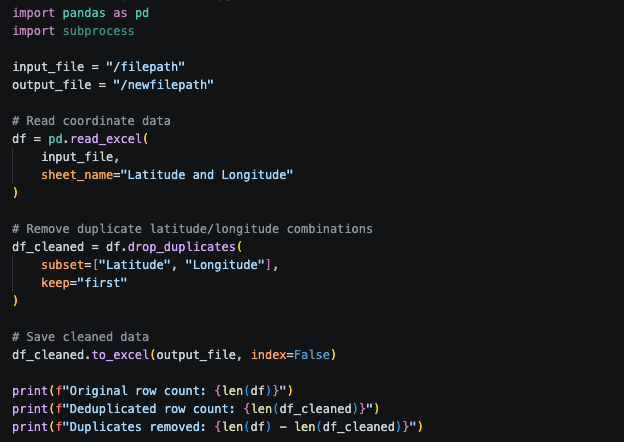
A short Python script that uses pandas to automate the deduplication.
- Read the worksheet with
pd.read_excel(). - Used
drop_duplicates()on the latitude and longitude columns to keep only unique combinations, keeping the first occurrence of each. - Exported the cleaned data to a new Excel file.
- Printed row counts before and after, so the result can be checked at a glance.
- Used Python's
subprocessmodule to open the output file in Excel.
The core of it is one call:
df_cleaned = df.drop_duplicates(
    subset=["Latitude", "Longitude"],
    keep="first"
)
The win
What worked, and how do I know?
The script reads, deduplicates, and exports coordinate data without modifying the original file, and it can be run again on the next file.
It reports the original and final row counts, which makes it easy to verify how many duplicates were removed. The Excel export worked; opening the file automatically is the one step still to validate.
The lesson
What did I learn?
I ran into a macOS file permission error because Python was trying to save the output to a read-only directory. Fixing it taught me the difference between relative and absolute file paths, and how the working directory decides where Python reads and writes files.
I also learned how subprocess lets a script interact with applications outside Python.
Next improvement: accept the input file as an argument, so the script works on any file without editing paths in the code.